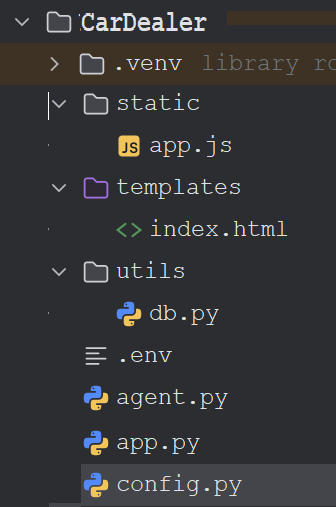
app.js code
const chatForm = document.getElementById("chat-form");
const userInput = document.getElementById("user-input");
const chatMessages = document.getElementById("chat-messages");

function addMessage(message, sender = "bot", type = "") {
    const div = document.createElement("div");

    div.classList.add("message");
    div.classList.add(sender);

    if (type) {
        div.classList.add(type);
    }

    div.textContent = message;

    chatMessages.appendChild(div);

    chatMessages.scrollTop = chatMessages.scrollHeight;
}

async function sendMessage() {

    const question = userInput.value.trim();

    if (!question) {
        return;
    }

    // Show user message
    addMessage(question, "user");

    userInput.value = "";

    // Show loading message
    const loadingDiv = document.createElement("div");
    loadingDiv.classList.add("message", "bot");
    loadingDiv.textContent = "Thinking...";
    chatMessages.appendChild(loadingDiv);

    chatMessages.scrollTop = chatMessages.scrollHeight;

    try {

        const response = await fetch("/chat", {
            method: "POST",
            headers: {
                "Content-Type": "application/json"
            },
            body: JSON.stringify({
                message: question
            })
        });

        const data = await response.json();

        // Remove loading message
        loadingDiv.remove();

        if (data.success) {

            addMessage(
                data.message,
                "bot"
            );

        } else {

            addMessage(
                data.message,
                "bot",
                "warning"
            );
        }

    } catch (error) {

        loadingDiv.remove();

        console.error(error);

        addMessage(
            "Sorry, something went wrong while contacting the server.",
            "bot",
            "error"
        );
    }
}

chatForm.addEventListener("submit", function (e) {
    e.preventDefault();
    sendMessage();
});
db.py
from sqlalchemy import create_engine
from config import *

DATABASE_URI = (
    f"mysql+pymysql://"
    f"{MYSQL_USER}:{MYSQL_PASSWORD}"
    f"@{MYSQL_HOST}:{MYSQL_PORT}"
    f"/{MYSQL_DATABASE}"
)

engine = create_engine(
    DATABASE_URI,
    pool_pre_ping=True
)
Here's the index.html file
<!DOCTYPE html>
<html lang="en">
<head>
    <meta charset="UTF-8">
    <meta name="viewport" content="width=device-width, initial-scale=1.0">
    <title>Car Dealer Analytics Assistant</title>

    <style>
        * {
            margin: 0;
            padding: 0;
            box-sizing: border-box;
            font-family: Arial, sans-serif;
        }

        body {
            background-color: #f4f6f9;
            display: flex;
            justify-content: center;
            align-items: center;
            height: 100vh;
        }

        .chat-container {
            width: 90%;
            max-width: 900px;
            height: 80vh;
            background: white;
            border-radius: 12px;
            box-shadow: 0 4px 15px rgba(0,0,0,0.1);
            display: flex;
            flex-direction: column;
            overflow: hidden;
        }

        .chat-header {
            background: #1f4e79;
            color: white;
            padding: 15px;
            font-size: 20px;
            font-weight: bold;
            text-align: center;
        }

        #chat-messages {
            flex: 1;
            overflow-y: auto;
            padding: 20px;
            background: #f8f9fa;
        }

        .message {
            max-width: 80%;
            margin-bottom: 15px;
            padding: 12px 15px;
            border-radius: 12px;
            word-wrap: break-word;
            line-height: 1.5;
        }

        .user {
            background: #007bff;
            color: white;
            margin-left: auto;
            text-align: right;
        }

        .bot {
            background: white;
            border: 1px solid #ddd;
            color: #333;
        }

        .warning {
            background: #fff3cd;
            color: #856404;
            border: 1px solid #ffeeba;
        }

        .error {
            background: #f8d7da;
            color: #721c24;
            border: 1px solid #f5c6cb;
        }

        .chat-input-container {
            border-top: 1px solid #ddd;
            padding: 15px;
            background: white;
        }

        #chat-form {
            display: flex;
            gap: 10px;
        }

        #user-input {
            flex: 1;
            padding: 12px;
            border: 1px solid #ccc;
            border-radius: 8px;
            font-size: 16px;
        }

        button {
            padding: 12px 20px;
            border: none;
            border-radius: 8px;
            background: #007bff;
            color: white;
            cursor: pointer;
            font-size: 16px;
        }

        button:hover {
            background: #0056b3;
        }

        .thinking {
            font-style: italic;
            color: #666;
        }
    </style>
</head>
<body>

<div class="chat-container">

    <div class="chat-header">
        Car Dealer Analytics Assistant
    </div>

    <div id="chat-messages">
        <div class="message bot">
            Hello! Ask me questions about your car dealer database.
        </div>
    </div>

    <div class="chat-input-container">
        <form id="chat-form">
            <input
                type="text"
                id="user-input"
                placeholder="Ask a question..."
                autocomplete="off"
                required
            >
            <button type="submit">
                Send
            </button>
        </form>
    </div>

</div>

<script>

const chatForm = document.getElementById("chat-form");
const userInput = document.getElementById("user-input");
const chatMessages = document.getElementById("chat-messages");

function addMessage(message, sender = "bot", type = "") {

    const div = document.createElement("div");

    div.classList.add("message");
    div.classList.add(sender);

    if (type) {
        div.classList.add(type);
    }

    div.textContent = message;

    chatMessages.appendChild(div);

    chatMessages.scrollTop = chatMessages.scrollHeight;
}

async function sendMessage() {

    const question = userInput.value.trim();

    if (!question) return;

    addMessage(question, "user");

    userInput.value = "";

    const loadingDiv = document.createElement("div");
    loadingDiv.classList.add("message", "bot", "thinking");
    loadingDiv.textContent = "Thinking...";
    chatMessages.appendChild(loadingDiv);

    chatMessages.scrollTop = chatMessages.scrollHeight;

    try {

        const response = await fetch("/chat", {
            method: "POST",
            headers: {
                "Content-Type": "application/json"
            },
            body: JSON.stringify({
                message: question
            })
        });

        const data = await response.json();

        loadingDiv.remove();

        if (data.success) {

            addMessage(
                data.message,
                "bot"
            );

        } else {

            addMessage(
                data.message,
                "bot",
                "warning"
            );
        }

    } catch (error) {

        loadingDiv.remove();

        console.error(error);

        addMessage(
            "Sorry, an unexpected error occurred.",
            "bot",
            "error"
        );
    }
}

chatForm.addEventListener("submit", function(event) {
    event.preventDefault();
    sendMessage();
});

userInput.addEventListener("keypress", function(event) {
    if (event.key === "Enter") {
        event.preventDefault();
        sendMessage();
    }
});

</script>

</body>
</html>
Here's the config.py code
import os
from dotenv import load_dotenv

load_dotenv()

MYSQL_HOST = os.getenv("MYSQL_HOST")
MYSQL_PORT = os.getenv("MYSQL_PORT")
MYSQL_USER = os.getenv("MYSQL_USER")
MYSQL_PASSWORD = os.getenv("MYSQL_PASSWORD")
MYSQL_DATABASE = os.getenv("MYSQL_DATABASE")

GROQ_API_KEY = os.getenv("GROQ_API_KEY")
GROQ_MODEL = os.getenv("GROQ_MODEL")
app.py code
from flask import Flask
from flask import render_template
from flask import request
from flask import jsonify

from agent  import ask_question

app = Flask(__name__)

@app.route("/")
def home():
    return render_template("index.html")

@app.route("/chat", methods=["POST"])
def chat():
  try:
    question = request.json.get("message")

    response = ask_question(question)

    return jsonify(response)
  except Exception as e:

      print(e)

      return jsonify({
          "success": False,
          "message": "An unexpected server error occurred."
      }), 500

if __name__ == "__main__":
    app.run(
        host="0.0.0.0",
        port=5000,
        debug=True
    )
Here's the agent.py code using create_sql_agent
from langchain_community.utilities import SQLDatabase
from langchain_community.agent_toolkits import create_sql_agent
from langchain_groq import ChatGroq

from config import *

db = SQLDatabase.from_uri(
    f"mysql+pymysql://"
    f"{MYSQL_USER}:{MYSQL_PASSWORD}"
    f"@{MYSQL_HOST}:{MYSQL_PORT}"
    f"/{MYSQL_DATABASE}"
)

llm = ChatGroq(
    api_key=GROQ_API_KEY,
    model=GROQ_MODEL,
    temperature=0
)

agent = create_sql_agent(
    llm=llm,
    db=db,
    verbose=True,
    handle_parsing_errors=True
)

SYSTEM_PROMPT = """
You are a Car Dealer Analytics Assistant.

Rules:
1. Use only database information.
2. Never invent values.
3. If information is unavailable say:
   'I cannot find that information in the database.'
4. Answer clearly and professionally.
5. Show totals and calculations when relevant.
"""


def ask_question(question):

    try:

        # Basic validation
        if not question or not question.strip():
            return {
                "success": False,
                "message": "Please enter a question."
            }

        result = agent.invoke({
            "input": question
        })

        answer = result.get("output", "").strip()

        # Agent couldn't find information
        if (
            not answer
            or "cannot find" in answer.lower()
            or "don't know" in answer.lower()
            or "do not know" in answer.lower()
            or "not available" in answer.lower()
        ):
            return {
                "success": False,
                "message": "I couldn't find enough information in the database to answer that question."
            }

        return {
            "success": True,
            "message": answer
        }

    except Exception as e:

        print("ERROR:")
        print(e)

        return {
            "success": False,
            "message": (
                "Sorry, I couldn't process your request. "
                "Please try rephrasing your question."
            )
        }
Here's the agent.py code without using create_sql_agent
from langchain_community.utilities import SQLDatabase
from langchain_groq import ChatGroq
from config import *
import re

db = SQLDatabase.from_uri(
    f"mysql+pymysql://"
    f"{MYSQL_USER}:{MYSQL_PASSWORD}"
    f"@{MYSQL_HOST}:{MYSQL_PORT}"
    f"/{MYSQL_DATABASE}"
)

llm = ChatGroq(
    api_key=GROQ_API_KEY,
    model=GROQ_MODEL,
    temperature=0
)

SYSTEM_PROMPT = """
You are a Car Dealer Analytics Assistant.

Rules:
1. Use only database information.
2. Never invent values.
3. Generate valid MySQL SQL queries only.
4. If information is unavailable say:
   'I cannot find that information in the database.'
5. Return only SQL query text.
"""

def generate_sql(question):
    schema = db.get_table_info()

    prompt = f"""
    {SYSTEM_PROMPT}

    Database Schema:
    {schema}

    User Question:
    {question}

    SQL Query:
    """

    response = llm.invoke(prompt)

    sql = response.content.strip()

    sql = sql.replace("```sql", "").replace("```", "").strip()

    return sql

def is_sql(text):

    sql_keywords = [
        "SELECT",
        "WITH",
        "SHOW",
        "DESCRIBE",
        "EXPLAIN"
    ]

    text = text.strip().upper()

    return any(text.startswith(keyword) for keyword in sql_keywords)

def ask_question(question):
    try:
        sql_query = generate_sql(question)

        print(f"Generated SQL: {sql_query}")

        # LLM did not generate SQL
        if not is_sql(sql_query):
            return {
                "success": False,
                "message": "I cannot find that information in the database."
            }

        result = db.run(sql_query)

        # Empty result set
        if not result:
            return {
                "success": False,
                "message": "No matching records were found."
            }

        final_prompt = f"""
        User Question:
        {question}

        SQL Query:
        {sql_query}

        SQL Result:
        {result}

        Provide a professional answer based only on the SQL result.
        """

        answer = llm.invoke(final_prompt)

        return {
            "success": True,
            "message": answer.content
        }

    except Exception as e:

        print(f"Database Error: {e}")

        return {
            "success": False,
            "message": "An unexpected error occurred while processing your request."
        }

if __name__ == "__main__":
    answer = ask_question(
        "What is the total revenue generated from car sales?"
    )

    print(answer)
Running the Application in PyCharm

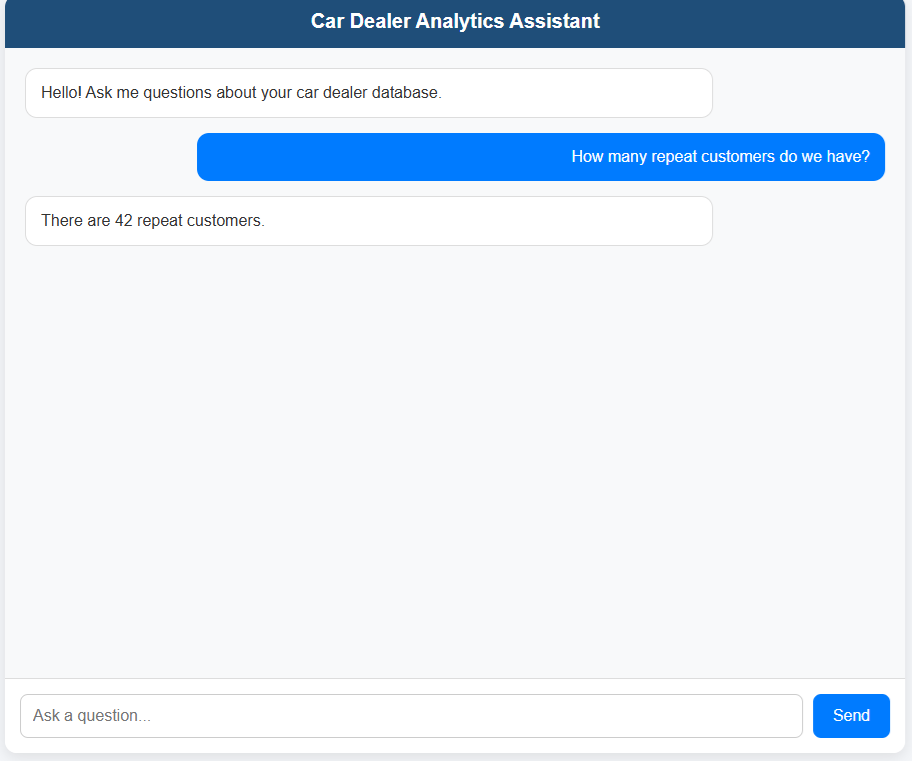
Some of the questions that can be asked to the Chatbot are:

How many Teslas are available?
Show all SUVs under $30,000.
How many repeat customers do we have?
Show customers who purchased more than one vehicle.