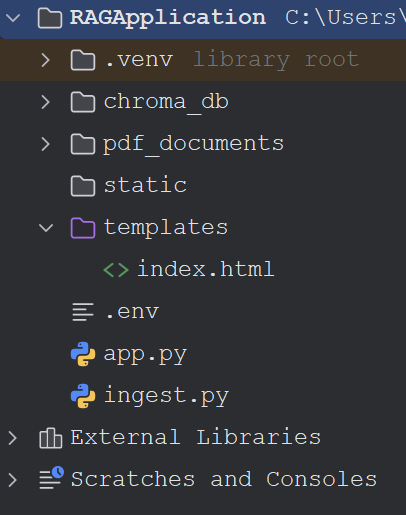
pdf_documents contains the following files.
|
|
We will build a RAG application using the following:
1. Flask
2. Groq
3. ChromaDB
4. LangChain
5. PDF documents in pdf_documents
pip install flask python-dotenv
pip install langchain
pip install langchain-core
pip install langchain-community
pip install langchain-groq
pip install langchain-chroma
pip install langchain-huggingface
pip install langchain-text-splitters
pip install chromadb
pip install pypdf
pip install sentence-transformers
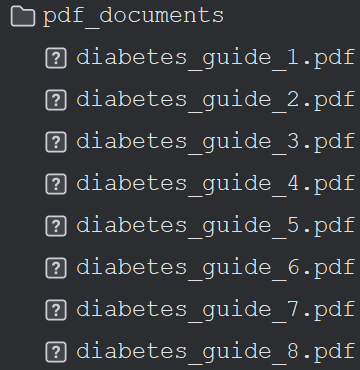
pdf_documents contains the following files.
import os
import shutil

from langchain_community.document_loaders import PyPDFLoader
from langchain_text_splitters import RecursiveCharacterTextSplitter

from langchain_huggingface import HuggingFaceEmbeddings
from langchain_chroma import Chroma

PDF_FOLDER = "pdf_documents"
DB_FOLDER = "chroma_db"

# --- ADD THIS BLOCK TO CLEAR OLD DATA ---
if os.path.exists(DB_FOLDER):
    print("Clearing old database...")
    shutil.rmtree(DB_FOLDER)
# ----------------------------------------

print("Loading PDFs...")

documents = []

for file in os.listdir(PDF_FOLDER):

    if file.endswith(".pdf"):

        pdf_path = os.path.join(PDF_FOLDER, file)

        loader = PyPDFLoader(pdf_path)

        docs = loader.load()

        for doc in docs:
            doc.metadata["source_file"] = file

        documents.extend(docs)

print(f"Loaded {len(documents)} pages")

# Chunking

splitter = RecursiveCharacterTextSplitter(
    chunk_size=1000,
    chunk_overlap=200
)

chunks = splitter.split_documents(documents)

print(f"Created {len(chunks)} chunks")

# Embeddings

embeddings = HuggingFaceEmbeddings(
    model_name="sentence-transformers/all-MiniLM-L6-v2"
)

# Create ChromaDB

vectorstore = Chroma.from_documents(
    documents=chunks,
    embedding=embeddings,
    persist_directory=DB_FOLDER
)

print("Chroma database created successfully.")
import os

from flask import Flask
from flask import render_template
from flask import request

from dotenv import load_dotenv

from langchain_groq import ChatGroq

from langchain_core.prompts import ChatPromptTemplate

from langchain_huggingface import HuggingFaceEmbeddings
from langchain_chroma import Chroma

# ------------------------------------
# Load Environment Variables
# ------------------------------------

load_dotenv()

GROQ_API_KEY = os.getenv("GROQ_API_KEY")
GROQ_MODEL = os.getenv("GROQ_MODEL")

# ------------------------------------
# Flask
# ------------------------------------

app = Flask(__name__)

# ------------------------------------
# LLM
# ------------------------------------

llm = ChatGroq(
    api_key=GROQ_API_KEY,
    model=GROQ_MODEL,
    temperature=0
)

# ------------------------------------
# Embeddings
# ------------------------------------

embeddings = HuggingFaceEmbeddings(
    model_name="sentence-transformers/all-MiniLM-L6-v2"
)

# ------------------------------------
# Load Chroma
# ------------------------------------

vectorstore = Chroma(
    persist_directory="chroma_db",
    embedding_function=embeddings
)

retriever = vectorstore.as_retriever(
    search_type="similarity",
    search_kwargs={
        "k": 7  # Pulls 7 chunks instead of 5 to provide more context
    }
)


# ------------------------------------
# Prompt
# ------------------------------------

prompt = ChatPromptTemplate.from_template("""
You are a helpful AI assistant.

Answer the question based on the supplied context. Use factual details from the context to form your answer.

If the context completely lacks any information to answer the question, reply exactly:
"I could not find the answer in the uploaded documents."

Context:
{context}

Question:
{question}
""")

# ------------------------------------
# Home
# ------------------------------------

@app.route("/", methods=["GET", "POST"])
def home():

    answer = ""
    sources = []

    if request.method == "POST":

        question = request.form["question"]

        # Retrieve documents

        docs = retriever.invoke(question)

        # Build context

        context = "\n\n".join(
            doc.page_content
            for doc in docs
        )

        # Get sources

        for doc in docs:

            filename = doc.metadata.get(
                "source_file",
                "Unknown"
            )

            if filename not in sources:
                sources.append(filename)

        # Create chain

        chain = prompt | llm

        response = chain.invoke({
            "context": context,
            "question": question
        })

        answer = response.content

    return render_template(
        "index.html",
        answer=answer,
        sources=sources
    )

# ------------------------------------
# Run
# ------------------------------------

if __name__ == "__main__":
    app.run(debug=True)
GROQ_API_KEY=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

GROQ_MODEL=llama-3.3-70b-versatile
<!DOCTYPE html>
<html>

<head>

    <title>PDF RAG Chatbot</title>

    <style>

        body{
            width:80%;
            margin:auto;
            margin-top:40px;
            font-family:Arial;
        }

        textarea{
            width:100%;
            height:120px;
        }

        button{
            margin-top:10px;
            padding:10px;
        }

        .answer{
            margin-top:25px;
            padding:15px;
            background:#f4f4f4;
            border:1px solid #ddd;
        }

    </style>

</head>

<body>

<h2>Groq + Chroma PDF RAG</h2>

<form method="POST">

<textarea
name="question"
placeholder="Ask a question..."
required></textarea>

<br>

<button type="submit">
Ask
</button>

</form>

{% if answer %}

<div class="answer">

<h3>Answer</h3>

<p>{{ answer }}</p>

<h4>Sources</h4>

<ul>

{% for source in sources %}

<li>{{ source }}</li>

{% endfor %}

</ul>

</div>

{% endif %}

</body>
</html>
1. Log in or Create an Account: Visit the Groq Cloud Console.
2. Sign in with your existing email or quickly authenticate using a Google account.
3. Navigate to Keys: Click on the API Keys tab located in the left sidebar menu.
4. Generate the Key: Click the Create API Key button.
1. Run the Ingest.py
2. Run the application.
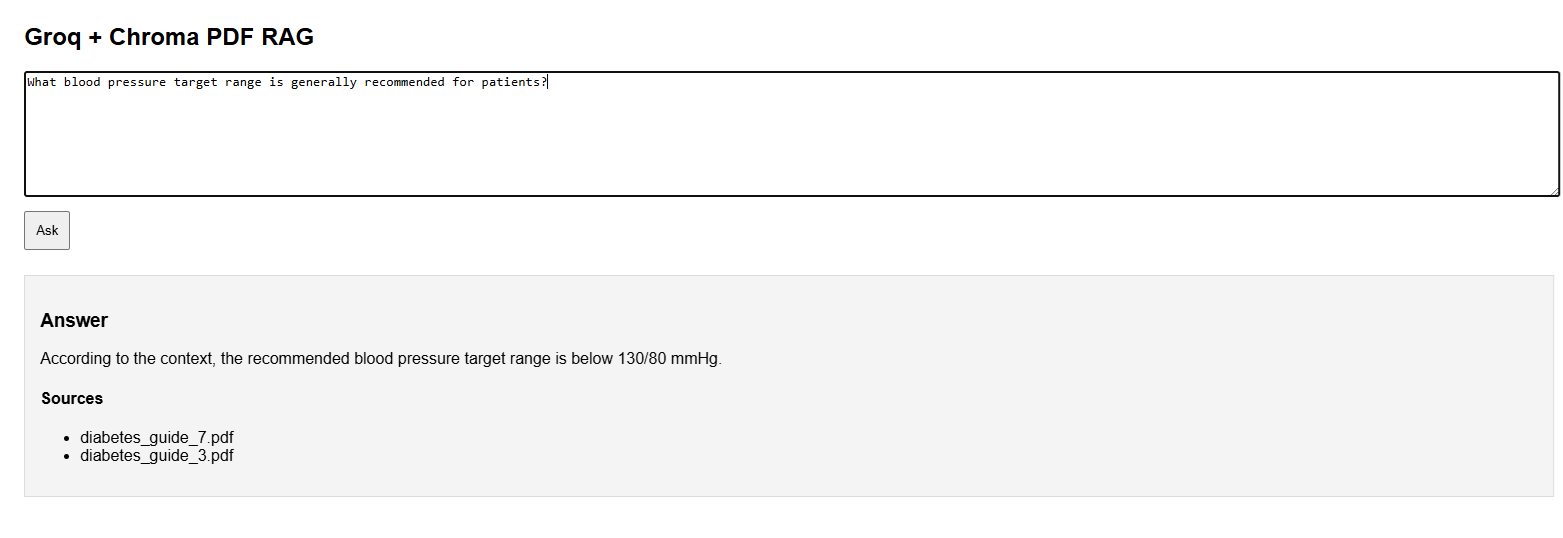
Screenshots are attached below..

Download Rag Files from: RAG Files